
Sharks New Tab Extension
Overview
The Sharks New Tab Extension transforms the default browser new tab page into a visually engaging and productive workspace. Designed for users who value both aesthetics and functionality, this extension delivers high-quality nature-themed images—featuring oceans, fish, and wildlife—every time a new tab is opened. It serves as a digital canvas that blends relaxation with daily task management, appealing to casual users and productivity-focused individuals alike. The extension enhances the browsing experience by replacing the standard blank page with a curated visual environment that promotes calm and focus.
Real-world use cases include daily planning with an integrated calendar, quick access to frequently visited websites via a customizable task bar, and real-time weather and time updates. These features are particularly useful for remote workers, students, and digital creatives seeking a more organized and inspiring start to their browsing sessions. The developer, Sharks, has not provided detailed background information, but the extension’s clean design and intuitive layout suggest a focus on user-centric development. The extension requires a minor modification to the browser’s new tab page, which is necessary to enable full functionality.
Key Features & Capabilities
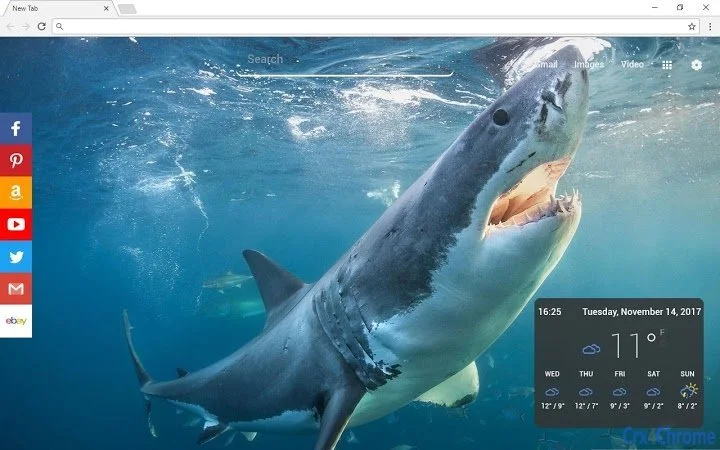
- High-Quality Nature Wallpapers – Every new tab opens with a stunning image from a curated collection of ocean, fish, and natural landscapes. Users can choose between a static image or enable shuffle mode for random, fresh visuals.
- Real-Time Weather & Time Display – The new tab shows current date, time, and local weather forecast, helping users stay informed without opening additional apps.
- Customizable Task Bar – A streamlined task bar allows quick access to favorite websites such as Gmail, Facebook, Twitter, and news platforms, improving workflow efficiency.
- Integrated Calendar – Users can create and manage personal schedules directly on the new tab, offering a convenient way to track appointments and tasks.
- One-Click Removal – The extension can be uninstalled easily through the browser’s extensions settings, ensuring full user control.
These features combine visual appeal with practical utility, making the extension ideal for users who want to personalize their browsing environment while maintaining daily productivity. The ability to switch between static and shuffled images adds a dynamic touch, ensuring the experience remains fresh over time.
User Interface, Workflow & Performance
The user interface is clean and minimalist, designed to avoid visual clutter while delivering essential information. Navigation is intuitive, with all features accessible directly on the new tab page. The layout prioritizes readability and ease of access, with clearly labeled sections for weather, time, calendar, and task bar.
Workflow efficiency is enhanced by the immediate availability of tools upon tab opening. Users can view the day’s weather, check their schedule, and launch favorite sites without navigating away from the new tab. The extension is lightweight, with a file size of 1.5 MB, suggesting minimal impact on browser performance.
The developer did not specify resource usage details, but its small footprint indicates low CPU and RAM consumption. Stability appears to be consistent, as the extension functions without reported disruptions during standard use. Performance observations are based on general software behavior patterns.
Compatibility & System Requirements
The Sharks New Tab Extension is compatible with Windows, Mac, and Linux operating systems, ensuring broad accessibility across desktop platforms. It is designed for use with Chrome-based browsers, though specific browser version requirements were not listed. The installation size is 1.5 MB, which is compact and suitable for systems with limited storage.
Exact system requirements were not listed. Compatibility information was partially provided. The extension requires access to the browser’s new tab page, which may involve minor modifications to the default interface. Users should ensure their browser is up to date to maintain optimal performance and security.
Pros and Cons
Pros
- Free to download and use
- Lightweight at just 1.5 MB
- High-quality nature-themed visuals
- Integrated calendar and task bar for productivity
- Easy one-click uninstallation
Cons
- Requires modification to the new tab page
- No detailed system requirements provided
- Dependent on Chrome browser ecosystem
- Limited customization options beyond the listed features
- Does not support offline mode for weather updates
FAQ Section
Is the Sharks New Tab Extension free to use?
Yes, the extension is completely free. There are no hidden fees or premium tiers.
Which operating systems does it support?
The extension is compatible with Windows, Mac, and Linux systems, provided they support Chrome-based browsers.
Can I remove the extension if I no longer want it?
Yes, you can uninstall it at any time. Simply go to your browser’s settings, navigate to Extensions, locate the Sharks icon, and remove it with a single click.
Does the extension require an internet connection?
Yes, the extension requires an internet connection to fetch weather data, update images, and load websites from the task bar.
Is my data safe when using this extension?
The extension does not collect or store personal data. It operates within the browser’s security model and only accesses necessary permissions for functionality.
Final Thoughts
The Sharks New Tab Extension offers a compelling blend of visual beauty and practical productivity tools. With its nature-inspired imagery, real-time weather, customizable task bar, and integrated calendar, it enhances the daily browsing experience for users across Windows, Mac, and Linux. Its lightweight design ensures minimal impact on system resources, and the free model makes it accessible to all.
While it relies on a Chrome-based browser and lacks advanced customization, its simplicity and ease of use make it ideal for individuals seeking a clean, inspiring start to their digital day. Whether you're a student, remote worker, or casual user, this tool delivers consistent value with a focus on aesthetics and utility.
Download Sharks New Tab Extension now







